Message Placeholders in Chat Prompts
Message Placeholders allow you to insert a list of chat messages ([{role: "...", content: "..."}]) at specific positions within a chat prompt.
You can define multiple placeholders in a prompt and resolve them with different values at runtime. Message Placeholders are also supported in the Playground and Prompt Experiments.
To use placeholders in your application, you need at least langfuse >= 3.1.0
(python) or langfuse >= 3.38.0 (js).
Create prompt with placeholders
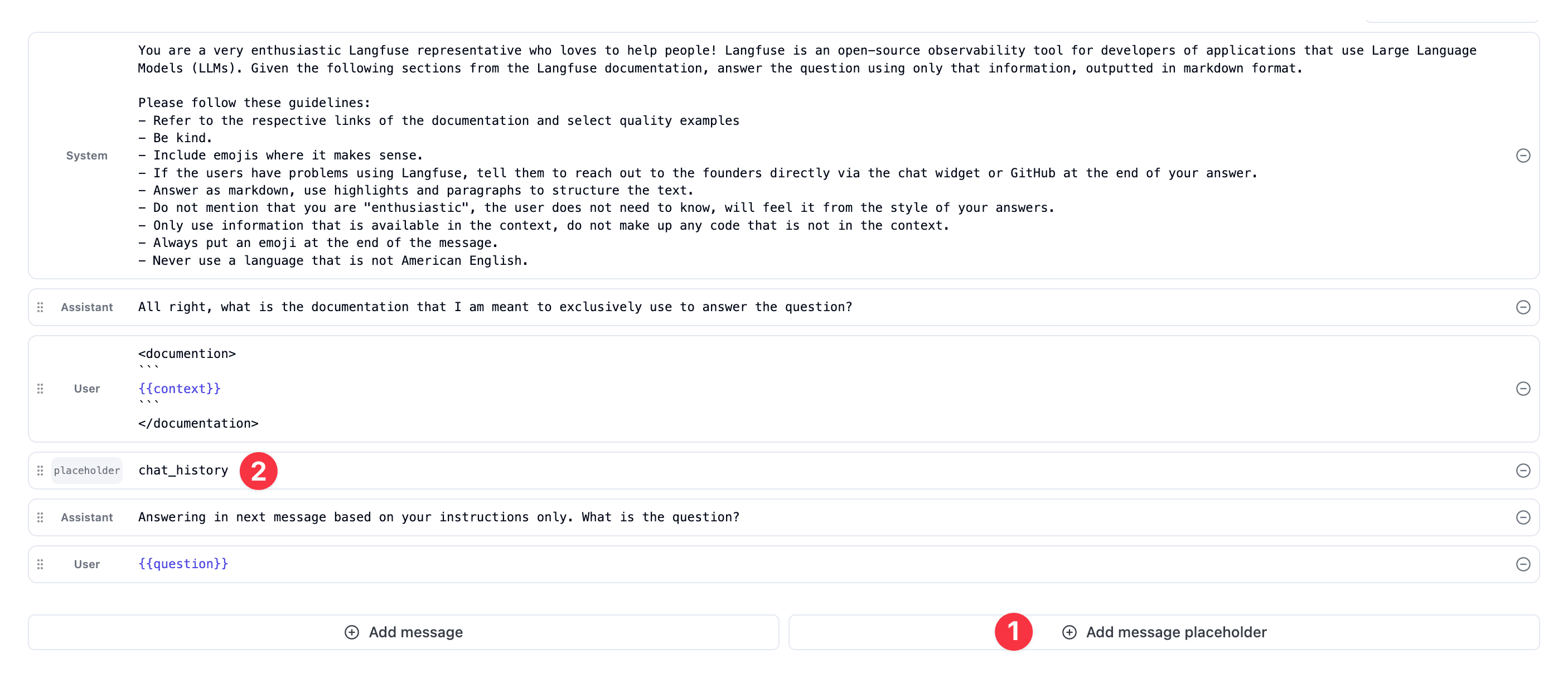
- Create a placeholder in any prompt by using the
Add message placeholderbutton. - Select a
namefor the placeholder that will be used to reference it in your application.
Resolve placeholders at runtime
In the SDKs, use the .compile(variables, placeholders) method on a ChatPromptClient to set the values to be filled in for the placeholders.
The filled in messages should be of the ChatMessage format with a role and content property, but custom formats are also accepted as compile does not validate the format of the messages.
from langfuse import get_client

langfuse = get_client()

# Use prompt with placeholders in your application
prompt = langfuse.get_prompt("movie-critic-chat")

# Compile the variable and resolve the placeholder with a list of messages.
compiled_prompt = prompt.compile(criticlevel="expert", chat_history=[
  {"role": "user", "content": "I love Ron Fricke movies like Baraka"},
  {"role": "user", "content": "Also, the Korean movie Memories of a Murderer"}
])

# -> compiled_prompt = [
#   { "role": "system", "content": "You are an expert movie critic" },
#   { "role": "user", "content": "I love Ron Fricke movies like Baraka" },
#   { "role": "user", "content": "Also, the Korean movie Memories of a Murderer" },
#   { "role": "user", "content": "What should I watch next?" },
# ]
Not exactly what you need? Consider these similar features:
- Variables for inserting dynamic text into prompts
- Prompt references for reusing sub-prompts
Prompt Composability
Reference other prompts in your prompts using a simple tag format.
Config
The prompt config in Langfuse is an optional JSON object attached to each prompt that stores structured data such as model parameters (like model name, temperature), function/tool parameters, or JSON schemas.


